Hi.Events v2: recurring events, reserved seating and a box office
The biggest release since we started. Events that repeat, seats people can pick, a till for the door, and a much nicer way to set up tickets.

Hi.Events v2 is out. It’s the biggest release we’ve done by a long way, and most of it comes straight from organisers telling us what they couldn’t do yet.
Some of you run the same show every week and were creating each date by hand. Some run theatres and had to send people to another system to pick a seat. Plenty sell tickets on the door and were doing it on a spreadsheet and a card machine that knew nothing about the event. v2 covers all three, along with a rebuilt ticket editor, a checkout that stays on your own site, and a long list of smaller things.
Events that repeat
An event in Hi.Events can now have up to 1,200 dates. You set up a schedule once, say every Tuesday and Thursday at 20:00 until the end of June, and Hi.Events creates every date for you. It can repeat daily, weekly, monthly or yearly, with several times a day, and each time slot can have its own label and length, so a matinee and an evening show sit on the same schedule.
Each date then has its own life. It can have its own capacity, its own prices, its own venue, and its own set of tickets on sale. You can cancel one date without touching the rest of the run, and everyone booked on it gets an email. Tick one box and their orders are refunded in the same step. If an order covers several dates, it’s left for you to refund by hand, so nobody loses the other nights they paid for. Buyers see a calendar and pick a date and a time. If you choose to show capacity, they get a heads-up when a session is nearly full, and you can link straight to a specific date from anywhere.
Seats people can pick
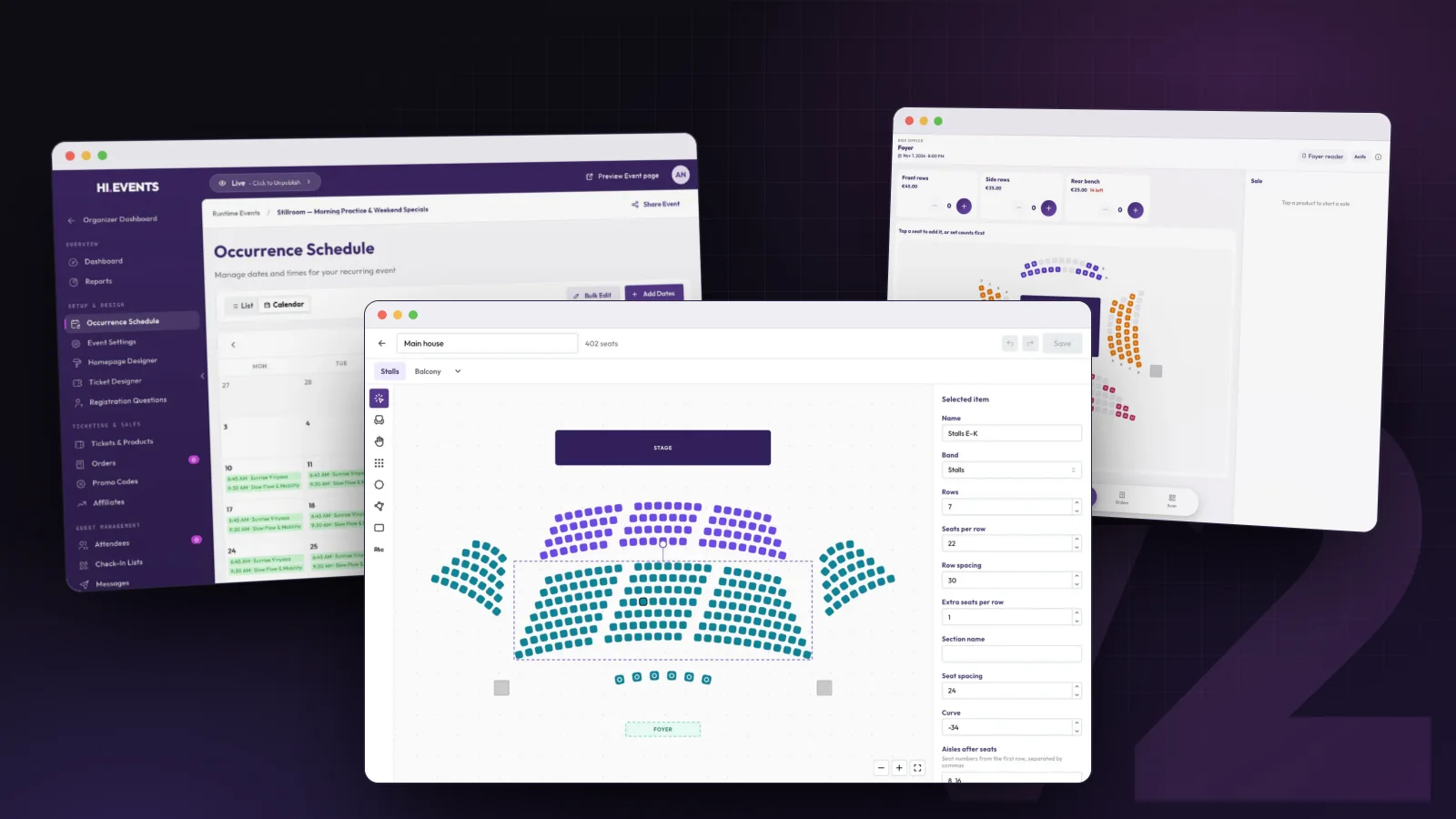
Reserved seating is the other big one. You draw your room in the seat map designer, with straight or curved rows, tables, standing areas, a stage and the bars. Or start from one of five templates for a theatre, banquet, club, conference or thrust stage and change it to suit. A map holds up to 3,000 seats, and you save it once and reuse it for every event in that room.
Seats are grouped into price bands and each band links to your tickets, so the front stalls can sell as adult or concession at different prices. Buyers pick their own seats on the map or ask for the best available, and Hi.Events finds seats together as near the stage as it can. There’s an option to stop people leaving a single empty seat stranded between two bookings, which anyone who has run a theatre will know the value of.
Have a go yourself. This is a small working version of the map your buyers see.
Seats are held while someone goes through checkout, so two people can’t pay for the same seat. On the night, you can hold seats back, move an attendee to a different seat, and print a map of the house. Every date of a recurring event sells its own seats.
A box office for the door
The box office is for selling at the door, or anywhere else you’re selling in person. It runs in the browser on an iPad, an Android tablet, a phone or a laptop. Your door staff open a link, enter a PIN, and they’re selling. They don’t need a Hi.Events account.
They can take cash and it works out the change, take a card on a Stripe smart reader like the S700 or WisePOS E, give out a comp, or record a sale paid some other way. The buyer’s email is optional, which matters when there’s a queue behind them. For seated events the box office shows the same seat map, with best available, so selling the last two seats together at the door takes a couple of taps. A cash sale can be voided for 30 minutes afterwards if someone changes their mind.
Everything sold on the door lands in the same orders, attendee lists and reports as your online sales, so there’s no reconciling two systems at the end of the night.
Hi.Events v2 adds recurring events, reserved seating and a browser-based box office with Stripe card reader support. Recurring events are open source, and seating and the box office are in early access on Hi.Events Cloud.
A better way to set up tickets
Creating and editing tickets used to happen in a cramped modal. It now opens in a wide drawer with a live preview of the real ticket widget next to your settings, so you see exactly what buyers will see as you type.
Tickets can have add-ons now. Merch, parking or a workshop upgrade sit under the ticket they belong to and only become available once that ticket is in the basket. Tiered tickets can release in order, so the next tier only opens once the one before it has sold out or its sale has ended, which is how most people want early bird pricing to work anyway.

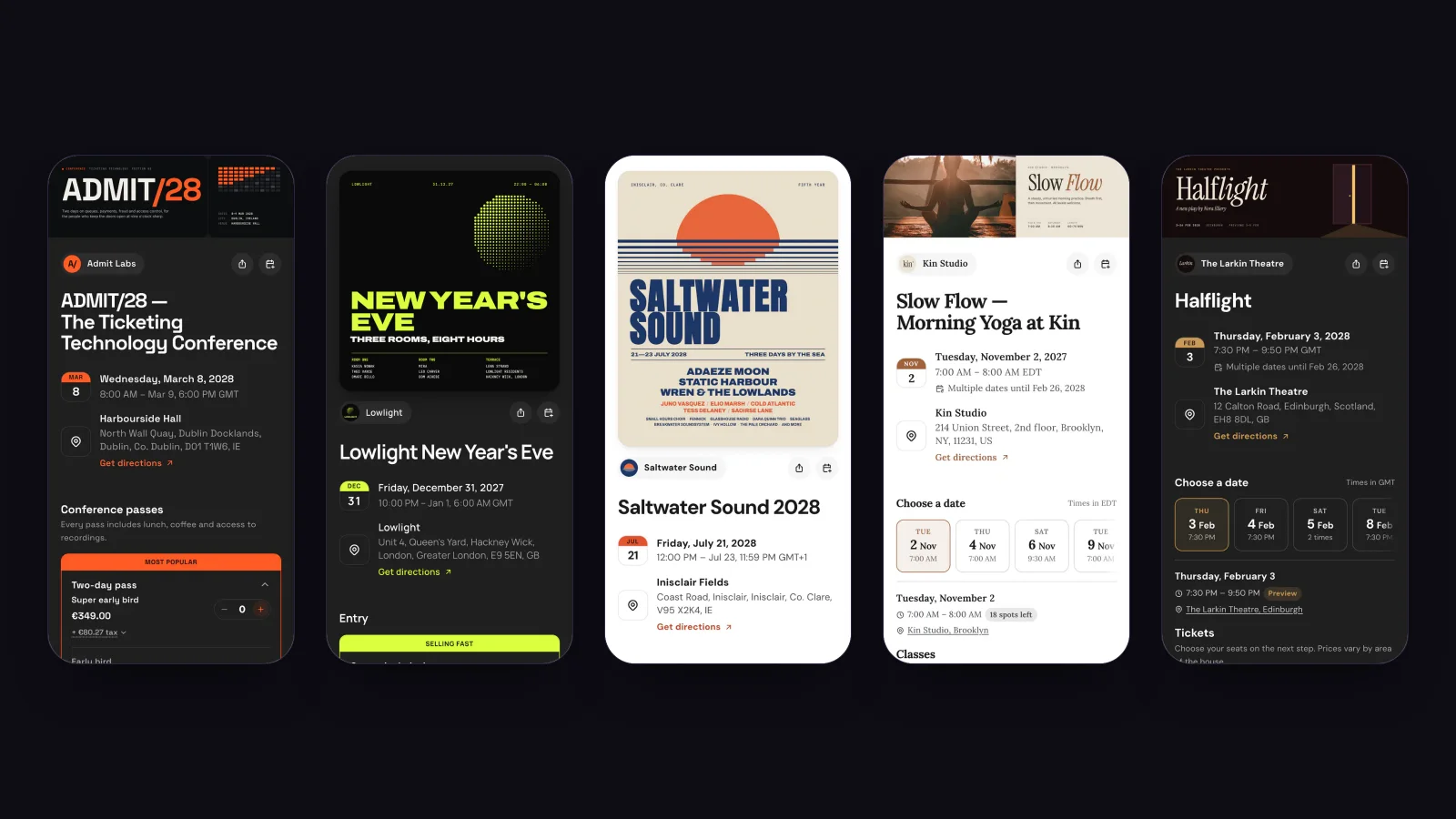
The ticket selection buyers see got a proper redesign too. Prices are clearer, fees and tax fold out into a breakdown if someone wants it, and if you show how many are left, the count now sits in a pill next to the ticket name.
Checkout that stays on your site
If you embed Hi.Events on your own website, the rest of the checkout now opens in a window over your page once someone picks their tickets, right through to payment. Apple Pay and Google Pay work inside it, and your site’s design can’t clash with it. You don’t have to change anything: the embed code is the same, and existing embeds pick it up automatically.
And a lot more
The check-in app was rebuilt with separate tabs for scanning, searching and live stats, plus an undo for accidental check-ins and a date filter for recurring events.
Venues are now saved to a location library with address lookup, so you’re not retyping the same address for every event. Stripe and payment settings moved to the organiser, which means one account can run several organisers that each get paid into their own Stripe account. The dashboard has sparklines and a period picker, and it checks for missing pieces before you publish. The event category now sets the default wording, so an event in the Wellness category says “Classes” and “Book Now” out of the box. There’s also account deletion, recording refunds on offline payments, and nine new event categories.
Everything above is live on Hi.Events Cloud for all organisers today.
For the technically minded
If you run your own copy of Hi.Events, recurring events and the rest of v2 are part of the open-source release, apart from paying each organiser into its own Stripe account, which is a Cloud feature since a self-hosted install uses its own Stripe keys. Reserved seating, a box office and company SSO need a paid licence. The upgrade notes are on the GitHub release.
If you build on the REST API, it’s now properly documented. v2 ships an OpenAPI spec generated straight from the code, so the docs always match what the API actually does. If you self-host, you can switch on interactive docs or export the spec to generate a client.
And if you want to know what it took to make recurring dates behave around clock changes and schedules that change after tickets are sold, we wrote that up in recurring events are harder than they look.