Recurring events are harder than they look
"Every Tuesday at 8" sounds like one line of code. It turned out to be a few months of clocks, calendars and people who had already bought tickets.

Recurring events were one of the things people asked us for most. A weekly comedy night, a yoga class three mornings a week, a museum with timed entry every half hour. Before v2 you had to create each date as its own event, which is fine for four dates and miserable for two hundred.
“Every Tuesday at 8” sounds like one line of code. It took a good few months, and most of that time went on three things: clocks, calendars, and the fact that people buy tickets for dates you might later want to change. This is a write-up of what we ran into and how the code handles it. Everything here is in the open-source repo if you want to read along.
What a schedule looks like
The first decision was how to store the rule itself. The obvious answer is RRULE, the format from the iCalendar spec that every calendar app understands. We went with our own JSON instead, and it’s a fairly small object:
{
  "frequency": "weekly",
  "interval": 1,
  "days_of_week": ["tuesday"],
  "times_of_day": [
    { "time": "20:00", "label": "Evening show", "duration_minutes": 90 }
  ],
  "range": { "type": "until", "start": "2026-10-06", "until": "2027-06-29" },
  "excluded_occurrences": ["2026-12-29 20:00"]
}
RRULE can describe the repeat, and EXDATE and RDATE cover skipped and extra dates. You could do the time slots too, with one VEVENT per slot, each with its own RRULE, length and title. We went our own way for two reasons. We wanted a single object per schedule that the form in the app edits directly. And in two places we wanted different behaviour from the spec. RFC 5545 says a recurring session that falls in the hour the clocks skip should be dropped, and so should a yearly 29 February in the years that don’t have one. We move the first and clamp the second, so we’d have been working against any RRULE library anyway.
The rule never leaves the organiser’s time zone. “20:00” means eight in the evening wherever the event is, and that’s where the first real problem starts.
When the clocks change
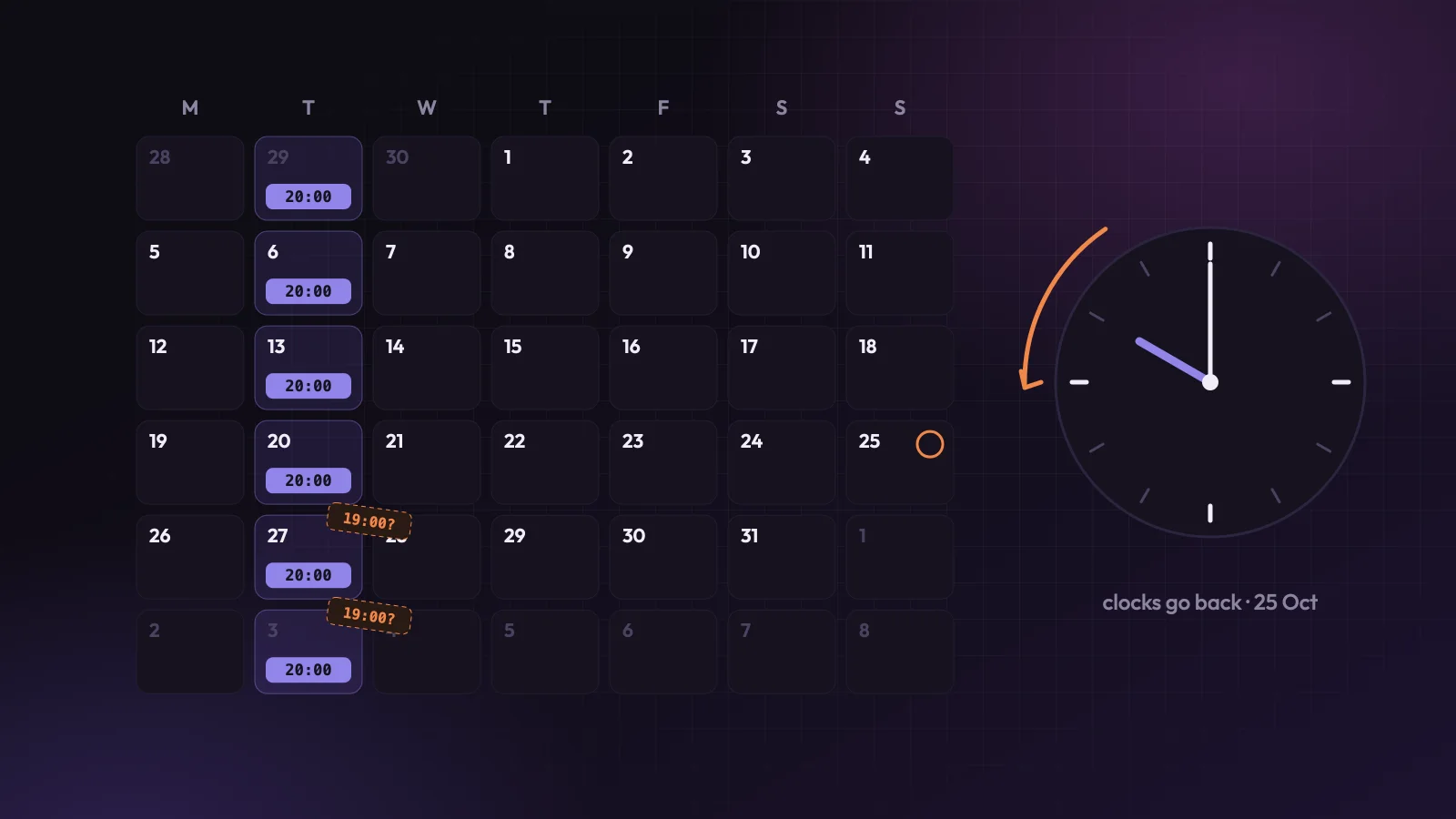
The tempting way to build this is to work out the first date in UTC, then add seven days for every week after it. It works perfectly until the clocks change, and then every date until the next change is an hour out.
Here’s what that looks like. The middle column is the add-seven-days approach, and the last column is what the organiser actually asked for.
The fix is to never do arithmetic on the UTC times. The parser walks the calendar in the organiser’s own time zone, sets the wall-clock time on each date, and only then converts that one date to UTC:
$start = $date->setTime((int) $parts[0], (int) $parts[1], 0);
// ...
$startUtc = $start->setTimezone('UTC');
That’s from RecurrenceRuleParserService. Each date gets its own conversion, so 20:00 in Dublin is 19:00 UTC in early October and 20:00 UTC once the clocks go back on the 25th, and both are right.
A recurring rule has to be kept in the organiser’s local time and time zone and turned into UTC one date at a time, because adding 7 days to a UTC time moves every later session by an hour in places that change their clocks.
There’s a catch here that we haven’t solved yet. Once a date is generated, we store it in UTC. If a government changes its clock rules, which happens more often than you’d think (Mexico dropped daylight saving in 2022, for one), or an organiser changes the event’s time zone, the stored dates don’t move with it. Regenerating fixes the dates nobody has bought, but sold ones stay at the old instant. The proper fix is to match dates on their local time and work the UTC out again when the rules change.
The hour that doesn’t exist
Weekly shows at eight in the evening are the easy case. The awkward ones are sessions in the small hours, which sounds rare until you sell tickets for club nights.
When the clocks go forward, an hour disappears. In Dublin, 01:00 to 01:59 on the last Sunday in March never happens. When they go back, that hour happens twice. If someone sets up a weekly Sunday session at 01:30, one date a year asks for a time that doesn’t exist, and another asks for a time that exists twice. The code still has to pick something.
For the missing hour, the time moves forward an hour, so 01:30 becomes 02:30 in Dublin and 02:30 becomes 03:30 in New York. RFC 5545 treats a single date in that hour the same way, although for a recurring rule it says to drop the session altogether. We’d rather the session still happened that night, a little later, which is what the clock on the wall would suggest anyway. There’s a test for this in New York, so a library upgrade can’t quietly change it.
The repeated hour is where we found something we didn’t expect while writing this post. Dublin and London share the same clocks all year. Ask our parser for 01:30 on the night the clocks go back and London gets the first 01:30, while Dublin gets the second one, an hour later in real time.
It also depends on how you build the time. The parser starts each date at midnight and then sets the time on it. Create the time in one go, with new DateTime('2026-10-25 01:30'), and you get the second 01:30 in both cities. As far as we can tell, PHP uses the daylight saving flag of the time you’re changing as a hint. Under the Standard Time Acts, Irish summer time is legally the standard time and winter time is the exception, and the time zone database records it that way, with winter marked as the daylight saving part of the year for Dublin. So Dublin’s midnight carries the opposite flag to London’s, and the answer flips.
RFC 5545 says an ambiguous time means the first one, so by the spec’s standard Dublin is getting it wrong. It only touches a session at half one in the morning, one night a year, in Ireland, but it’s a bug all the same. The fix is to pick the first 01:30 explicitly and stop leaving it to PHP, with tests for European zones alongside the New York ones, which is how this slipped through in the first place.
The 31st of February
Calendars cause a quieter version of the same problem. “Every month on the 31st” is a perfectly reasonable thing to type, and seven months a year don’t have a 31st.
There were two options: skip those months, or move the date back to the last day of the month. For monthly rules we skip them, which is also what RFC 5545 does. Someone who picks the 31st usually means that date, and a session quietly appearing on the 30th of April would be a surprise. If what you really want is one session near the end of every month, a “last Friday of the month” rule always lands.
Yearly rules go the other way, and this is one of the places we part company with the spec. An annual event on the 29th of February moves to the 28th in the three years out of four that don’t have one, because skipping would mean your yearly event happens every four years.
Changing a schedule that’s already on sale
This is the part that took longest, and there’s nothing clever about it. It’s just fiddly.
An organiser sets up a year of Tuesdays, sells tickets for a few of them, then changes the schedule. Maybe they add Thursdays, move the show to Wednesdays, or push the end date out. The app regenerates the dates from the new rule, and the question is what happens to the dates that already exist.
The generator matches each new date against the existing ones by its start time in UTC. A date that still matches is kept, and updated if its end time, capacity or label changed, unless it’s in use. New dates are inserted. Anything left over is a date the new rule no longer produces, and for those the answer depends on whether anyone has touched them.
If a date has orders, attendees, price overrides or product visibility settings, it’s in use, and it’s never deleted. It gets marked as overridden and left alone, so the people with tickets still have a date to turn up to. If an organiser has changed a date’s time, capacity or venue by hand, it’s marked as overridden too, and regeneration skips it. Cancelled dates are kept for the record. Only dates nobody has touched are deleted, and any waitlist entries on those dates are cancelled with them.
One consequence surprises people. If you change “Tuesdays at 20:00” to “Tuesdays at 20:30” after selling tickets, the Tuesdays you’ve already sold end up with both. The 20:00 dates with tickets (or their own prices) stay where the ticket holders expect them, and a new 20:30 date appears next to each one. Unsold 20:00 dates are simply replaced. Moving existing dates is a separate action, the bulk edit, which shifts the times of the dates you pick and records the old times as exclusions, so a later regeneration won’t put them back. If you want to move a schedule that’s on sale, shift the dates first and then change the rule, and you won’t get duplicates.
When a recurring schedule changes after tickets are sold, dates with orders or attendees on them are never deleted, so nobody holding a ticket loses the date they bought.
The date that came back from the dead
Generating a year of dates can take a while, so it runs as a queued job and the app polls until it’s done. That opens up a race that’s easy to miss.
The job carries a copy of the rule from when it was queued. If an organiser deletes a date, or moves one to a different time, while the job is still waiting its turn, the live rule gets an exclusion for the old slot, but the job’s copy doesn’t have it. The job runs, finds nothing at that time, and creates the date again. Cancelled dates were never at risk, because a cancelled date keeps its row and the generator matches it.
The fix is to take a lock on the event when the job starts, re-read the live rule, and merge in anything excluded since the job was queued:
$this->databaseManager->statement('SELECT pg_advisory_xact_lock(?)', [$dto->event_id]);

$event = $this->eventRepository->findByIdLocked($dto->event_id);

$rule = $this->mergeLiveExclusions($dto->recurrence_rule, $event->getRecurrenceRule() ?? []);
That’s in GenerateOccurrencesFromRuleHandler. Exclusions are stored by their local date and time, like “2026-12-29 20:00”, which is also what stops a later regeneration from bringing an excluded slot back.
That closes the gap we were worried about. It doesn’t make the job completely safe, though. Two schedule edits queued back to back still run in whatever order the workers pick them up, and merging only ever adds exclusions, so a date reactivated while a job is waiting can end up excluded again. Both are on our list to tighten up.
Every date has its own capacity
Once dates exist, each one needs its own capacity. Each has a capacity and a count of places used, and “sold out” is worked out from those two numbers every time, so there’s no separate sold-out flag to drift out of sync with them.
Tickets on a recurring event count per date by default. A ticket type with 50 available means 50 for every date, and an organiser can override that for a single date. Checkout locks the event, re-checks availability for each date in the order without using the cache, and then checks the whole order again, because one order can include tickets for more than one date.
1,200 and no more
A rule like “every 15 minutes, every day, forever” would generate dates until the database fell over, so there’s a cap of 1,200 dates per event. That’s enough for three sessions a day for a full year, with some to spare. It’s tight for something like half-hourly timed entry, which uses it up in under three months, so those schedules need setting up a season at a time for now.
The parser generates one date past the cap on purpose, so the app can tell the difference between exactly 1,200 dates and too many. The form shows a running count while you build the rule, and before anything is created the server does a dry run and turns down a rule that goes over.
There’s plenty more to do
This is the first version of recurring events, and there’s still a lot we want to add. If you run recurring events, your feedback is invaluable. Tell us what’s missing or what trips you up, either in a GitHub issue or by email to [email protected], and we’ll read it.